Streamline Your Schedule: The Editable June 2026 Calendar
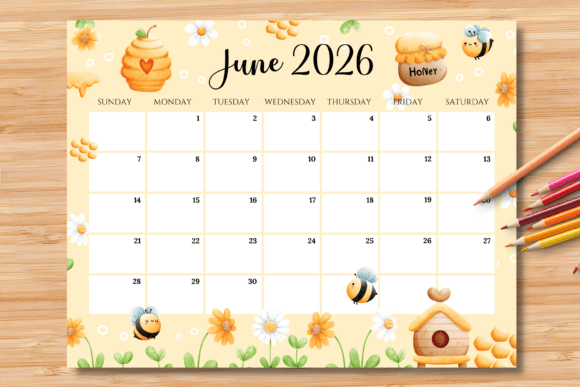
As we look toward the summer of 2026, organization becomes the bridge between chaos and creativity. For many designers, small business owners, and content creators, a calendar is not just a grid of dates; it is a central hub for planning launches, tracking client work, and scheduling social media content. However, finding a planning tool that is both functional and aesthetically pleasing can be a challenge. This is where the Editable/Fillable June 2026 Calendar steps in, offering a seamless blend of print-ready convenience and digital customization. It is designed specifically for those who need a tangible planning tool but want the flexibility to type their schedules rather than relying on potentially messy handwriting.
Designed for the Modern Workflow
The core appeal of this calendar lies in its dual-nature functionality. We understand that your workflow changes day by day. Sometimes, you need the tactile experience of writing down a to-do list with a favorite pen; other times, you need to type out a schedule quickly before printing it for a client meeting or a content strategy session. This calendar provides exactly that versatility.
The package includes two distinct file types to suit your specific needs:
- 1 Editable & Printable PDF File: This is your powerhouse for customization. You can open it in Adobe Reader, type directly into the designated blue boxes, and adjust the text properties before committing it to paper.
- 1 Printable PNG File: Ideal for those who prefer the analog approach. This high-quality image file is perfect for printing straight away, allowing you to fill in the details by hand for a personal touch.
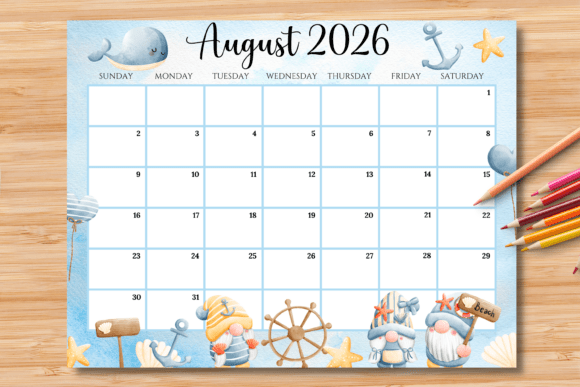
Formatted in a horizontal US Letter size (11 x 8.5 inches), the layout is optimized for landscape orientation. This aspect ratio is often preferred in professional environments because it sits comfortably on a desk or can be pinned to a cubicle wall without taking up too much vertical space. It mimics the aspect ratio of screens, making it feel familiar to digital natives who are used to working on monitors and laptops.
Mastering the Editable Features
One of the most significant advantages of this asset is the ability to customize the text without needing expensive design software like Adobe Illustrator or InDesign. The calendar is designed to be opened in Adobe Reader, which is free software available on almost every computer. This accessibility makes it a perfect tool for freelancers who need to present professional schedules to clients or project managers coordinating team deadlines.
The editing process is intuitive but requires a specific workflow to ensure the best results. The template utilizes "blue boxes" as editable fields. These boxes are your designated areas for entering dates, appointments, or notes. While you might see these blue guidelines on your screen, the clever design ensures they will not show up after printing. This gives you a clean, professional look on paper while maintaining a clear interface on your monitor.
Customizing Typography for Professional Impact
For the design-conscious user, the ability to change the font style within the PDF is a game-changer. If you are using this calendar as part of a brand identity kit or handing it to a client, you want the typography to match the project's tone.
Once you have opened the PDF in Acrobat Reader and typed in the blue boxes, you can fine-tune the appearance of your text. Here is the professional workflow:
- Open the PDF file in Acrobat Reader.
- Type your desired text into the blue boxes.
- Highlight the text you wish to modify.
- Press “Ctrl+E” (for Windows) or “Command+E” (for Mac).
- A "Format" toolbar will appear at the top of the window, allowing you to change the font, size, and color.
This feature allows you to move beyond generic text. You can match the calendar’s typography to your logo design or your website’s headings. Whether you prefer a sans serif font for a modern, clean look or a serif font for a more traditional, editorial feel, the choice is yours. This level of customization elevates the calendar from a simple utility to a premium design asset.
Practical Applications for Creatives and Businesses
A calendar is a versatile tool, but an editable calendar expands the possibilities for visual communication. Here is how different professionals can leverage this specific June 2026 calendar:
- Small Business Owners & Retailers: Use the editable fields to map out a "June Sales Event" or "Summer Launch Schedule." Print copies for your staff so everyone is aligned on inventory drops or promotional dates. Because you can edit the color and font, you can match the calendar to your in-store packaging or print materials.
- Social Media Managers & Marketers: June is a busy month with summer solstice and various niche holidays. Use the horizontal layout to plan your content grid. You can type out specific hashtags or campaign names in the boxes. Once printed, it serves as a tangible "big picture" view of your digital strategy, which is often easier to brainstorm on than a screen.
- Freelance Designers & Agencies: Create a branded "Client Project Timeline" for June 2026. By customizing the text to show deliverables and review dates, you provide clients with a professional presentation of their project roadmap. It shows attention to detail and helps manage expectations.
- Event Planners & Wedding Coordinators: For events happening in June—a popular month for weddings—this calendar can serve as a master timeline. You can type in vendor arrival times and ceremony cues, ensuring the printed sheet is legible for everyone involved in the coordination.
Ensuring a Flawless Print
While digital planning is efficient, the goal of this asset is a physical printout. Therefore, understanding the printing nuances is essential for professional presentation.
The files are set to a standard US Letter size, ensuring they fit easily into standard printers and binders. However, a small technical note is vital: the color may change slightly depending on your printer. This is a standard occurrence in print materials due to the difference between RGB (screen) and CMYK (printer) color profiles.
To ensure visual consistency, especially if you are distributing these calendars to clients or team members, try to use the same printer and paper stock for all copies. If you are using the PNG file for hand-drawing, consider using a heavy cardstock (80lb or higher) to prevent ink bleed-through, especially if you plan to use markers.
Why Horizontal Matters
The choice of a horizontal (landscape) orientation is intentional for editorial layouts and desk work. Vertical calendars are great for wall hanging, but horizontal calendars align with how we naturally view our workspace. It allows for wider columns for each day, which is crucial when you are typing in detailed schedules. If you were using a script font or a handwritten font style, the wider boxes ensure the text doesn't feel cramped, maintaining readability.
Restrictions and Licensing
It is important to address the usage rights to ensure you are using the asset correctly. This product is designed as a final tool for your planning needs. The files provided are final products.
This means you cannot resell the calendar template itself. You are buying the right to use it for your planning, not to sell the PDF or PNG file as a standalone product to others. This is a standard practice in the world of digital products and design assets. It protects the creator's work while giving you the freedom to use it for personal or commercial planning purposes. You can write all over it, edit the text, and print as many copies as you need for your own internal use or for your clients' planning sessions.
Integrating the Calendar into Your Brand Ecosystem
For those focused on brand recognition, every piece of paper that leaves your office is an opportunity to reinforce your identity. By taking the time to edit the font and color of this June 2026 calendar before printing, you transform a generic grid into a bespoke piece of marketing.
Imagine handing a potential client a project timeline that not only lists the dates but does so in your brand’s specific typeface. It communicates that you are organized, detail-oriented, and invested in your brand identity. It is a subtle but powerful way to improve audience engagement and trust.
As we approach the midpoint of 2026, having a reliable, customizable, and aesthetically pleasing way to track your time is not just a luxury—it is a necessity for staying competitive. Whether you are planning a product launch, organizing a family reunion, or simply trying to keep your freelance deadlines in check, this editable calendar provides the structure and flexibility you need to succeed.