Transform Flat SVGs into Stunning 3D Cake Toppers
There is a specific kind of magic that happens when a digital design breaks free from the screen and becomes a tangible, three-dimensional object. For designers and crafters alike, the journey from a flat vector file to a physical product is where creativity truly comes alive. If you have ever looked at a simple SVG file and wished you could add more depth and character to it, learning how to manipulate layers is your next essential skill. This process not only enhances your paper crafts but also sharpens your understanding of spatial design—a skill that translates directly into better packaging, branding, and visual storytelling.
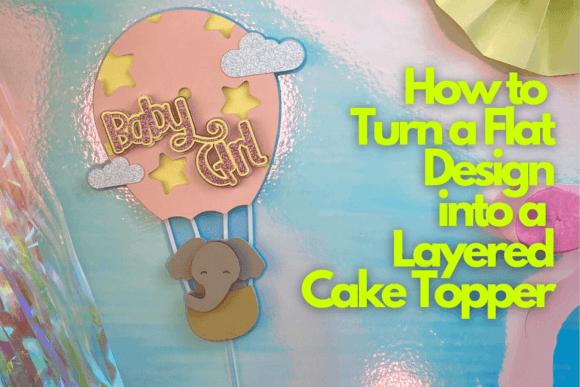
In this comprehensive guide, we are diving deep into the art of transforming flat designs into intricate, layered cake toppers. Inspired by the techniques taught by Ella from The Craftaholic Studio, we will explore how to take a standard design—like a charming baby elephant in a hot air balloon—and elevate it into a show-stopping centerpiece. Whether you are a small business owner looking to add value to your physical products, a hobbyist wanting to master new techniques, or a designer seeking to understand dimension in design, mastering this workflow is a game-changer.
The Design Space Workflow: More Than Just Cutting
The core of this transformation lies in how we utilize our design software, specifically focusing on the tools available in platforms like Design Space. It is easy to treat these programs merely as drivers for a cutting machine, but they are powerful vector editors capable of complex manipulation. To turn a flat design into a layered cake topper, you aren't just "printing" a shape; you are engineering a structure.
The process begins with a single flat design. For our example, we are using a baby elephant illustration. In its original form, it is a 2D outline. To create a 3D effect, we need to deconstruct the image into its component parts. This involves using slicing and contouring tools to separate the elephant's head, body, ears, and the hot air balloon basket. By duplicating these elements and slightly altering their sizes, we create the "shims" or layers that will give the final piece its height and shadow.
This approach mirrors the principles of packaging design and logo design. When a brand creates a logo, they often need variations that work in both flat digital formats and on physical signage where depth is required. Learning to visualize how a flat image stacks up in the Z-axis is a fundamental skill for any visual communicator.
Material Selection: The Foundation of a Professional Finish
A design is only as good as the materials it is printed on. In the realm of paper crafts, the weight, texture, and finish of your cardstock can make or break the project. Ella emphasizes the importance of choosing the right tools to ensure a "professional result," and this is where many crafters stumble.
For a cake topper that needs to stand up and hold its shape, standard 65lb cardstock is often too flimsy. You want to look for 80lb to 100lb cardstock. This provides the rigidity needed for the topper to stand tall in the cake without sagging. Additionally, consider the finish. A smooth finish is ideal for clean cuts, while a glitter or metallic finish can add a premium feel that elevates the entire aesthetic of the event.
This concept applies directly to branding and merchandise. If you are designing assets for a client, understanding how paper weight affects the perceived value of an invitation or a business card is crucial. A flimsy business card suggests a lack of investment, whereas a heavy, textured card conveys stability and quality. The same psychology applies to a cake topper; a sturdy, well-cut design signals care and attention to detail.
Typography and Dimension: Integrating Fonts into 3D Projects
While the elephant and balloon provide the visual focal point, the text element anchors the design. In this project, we are incorporating a custom font to spell out a name or a message. However, adding text to a 3D paper project requires a different approach than simply typing it out.
When working with fonts for cake toppers, readability is paramount. A highly decorative script font might look beautiful on a website, but when cut out of paper, the intricate swirls can become fragile and snap during assembly. You need to choose a typeface that balances personality with structural integrity.
Ella demonstrates how to modify a standard font to make it "weld" together. In vector software, welding joins individual letters into a single continuous shape, eliminating the cut lines between them. This turns a word into a solid banner or ribbon that can be layered just like the elephant. This technique is vital for creating social media graphics or digital products where you want text to feel cohesive rather than disjointed. It teaches you to think about the negative space within and around your typography.
Beyond the Cake: Real-World Applications for Layering Techniques
Why should a designer or entrepreneur care about cake toppers? Because the skills used here are transferable to high-value commercial applications. The ability to create depth is a powerful tool in your design arsenal.
Consider editorial design or poster design. Adding a "drop shadow" effect digitally is easy, but creating a layered paper effect for a photoshoot adds a tactile, human element that stands out in a feed dominated by flat digital renders. Many high-end brands are using paper craft techniques in their advertising to convey a sense of whimsy and craftsmanship.
Furthermore, this workflow is excellent for packaging design prototyping. Before sending a complex box design to a manufacturer, you can use your cutting machine to build a paper model. This allows you to test the structural integrity and the visual hierarchy of your graphics in the real world. It bridges the gap between the screen and the shelf.
For those running a small business, mastering the layered cake topper opens up a new revenue stream. Custom cake toppers are a massive market for weddings, birthdays, and corporate events. By applying modern typography and thoughtful layering, you can create a premium font and design experience that commands a higher price point than flat, printed toppers.
Assembly and Finishing Touches: The Art of Construction
The final phase of the project is assembly, and this is where patience pays off. It is not enough to simply glue the layers together; you must consider the spacing. Using foam adhesive squares or dots is the secret to achieving that professional "lift." The thickness of the adhesive determines the depth of the shadows between layers.
Ella guides us through the best techniques for alignment. A common mistake is applying glue haphazardly, resulting in a lopsided topper. By working from the bottom layer up and using a weeding tool to place adhesive precisely, you ensure the design looks balanced from every angle.
This attention to detail is what separates amateur work from professional design assets. In web design, we obsess over pixel-perfect alignment; in paper crafting, we obsess over millimeter-perfect layering. The discipline is the same. If you are creating invitations or print materials, this manual dexterity trains your eye to spot misalignments in digital layouts as well.
Mastering the Craft: Bonus Lessons and Continuous Improvement
The journey of learning How to Turn a Flat Design into a Layered Cake Topper doesn't end with the elephant. The techniques you learn—contouring, welding, offsetting, and layering—are the building blocks of countless other projects. Once you understand how to deconstruct a vector, you can apply this to shadow boxes, pop-up cards, and even 3D signage.
Ella’s class includes bonus lessons designed to help you master these concepts further. These resources are invaluable for anyone looking to speed up their workflow. For instance, learning keyboard shortcuts for alignment or understanding how to group objects efficiently can save hours of production time. This efficiency is critical for entrepreneurs who need to balance creativity with business operations.
Ultimately, turning a flat design into a layered masterpiece is about seeing potential. It is about looking at a serif font or a sans serif font and knowing how to turn it into a physical object that delights a client. It is about understanding that a handwritten font might need to be thickened to be cuttable, or that a display font might need to be simplified for legibility at small scales.
By embracing the tools and techniques of paper crafting, you aren't just making cake toppers; you are becoming a more versatile, tactile, and effective designer. So, load your mat, pick your cardstock, and start building. The world needs more designs that jump off the page.